



In this article:
- Section 1 with long heading text
- Section 2 with long heading text falling on to two lines
- Section 3 with long heading text
- Section 4 with long heading text falling on to two lines
Share this article


 Welcome to Friday series of blogs about Reporting. This week we look at the Income Report.
At Dentally we understand how important it is to manage your practice finances. The Income Report allows you to see your income streams and match income to practitioners within a specified date range.
See exactly what matters to you
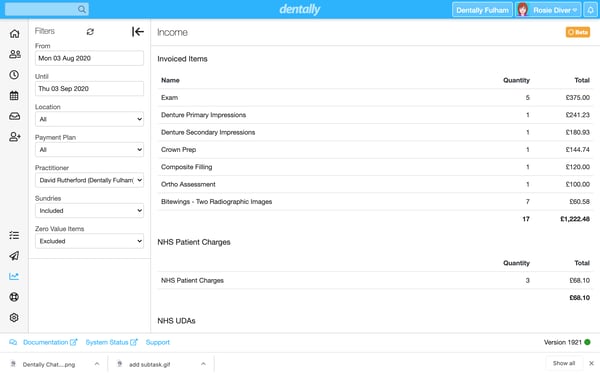
Use the Income Report to see an overview of every income stream, or filter to see exactly what matters to you the most. This might be by Location, by Practitioner or by Payment Plan. Include or Exclude Sundries to see how sundry sales affect your total income.
As you have come to expect from Dentally, we understand how sensitive this data is, and so we only permit those users with Level 3 or above permissions access to this report.
Use the Income report, in conjunction with the Takings Report to manage the unexplained payments, helping you keep your financial records up to date. Use the Income Report in conjunction with the Practitioner Activity report to ensure that associates are paid accurately.
To learn more about reporting in Dentally, look out for more in our reporting blog series or visit our website here.
Connect with us on social media
We'd love for you to join our online community. Stay up-to-date with our latest news, events, and content by following us on our social channels. We look forward to seeing you there!


