



In this article:
- Section 1 with long heading text
- Section 2 with long heading text falling on to two lines
- Section 3 with long heading text
- Section 4 with long heading text falling on to two lines
Share this article


Managing your incoming correspondence is made easy in Dentally whether you are a multi-site or a single site practice.
As a multi-site practice, you can select to see just the correspondence for one site, or to see and manage the incoming emails and SMS messages for all sites. Dentally allows you to work the way that suits your working practices.
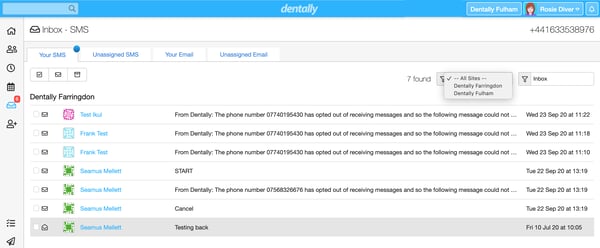
Select and assign correspondence
It’s very easy to manage your incoming emails and SMS messages. Simply use the filter to select the site you wish to work on, and assign messages to the correct patient in the correct practice, based on their registered site. Easy to see other practices’ correspondence should you need to help them out, simply change the filter to display their details. As long as you have the correct permission levels, you will be able to assign correspondence and clear that inbox.
To learn more about our multi-site features, take a look at our website here.
Connect with us on social media
We'd love for you to join our online community. Stay up-to-date with our latest news, events, and content by following us on our social channels. We look forward to seeing you there!


